


Overview
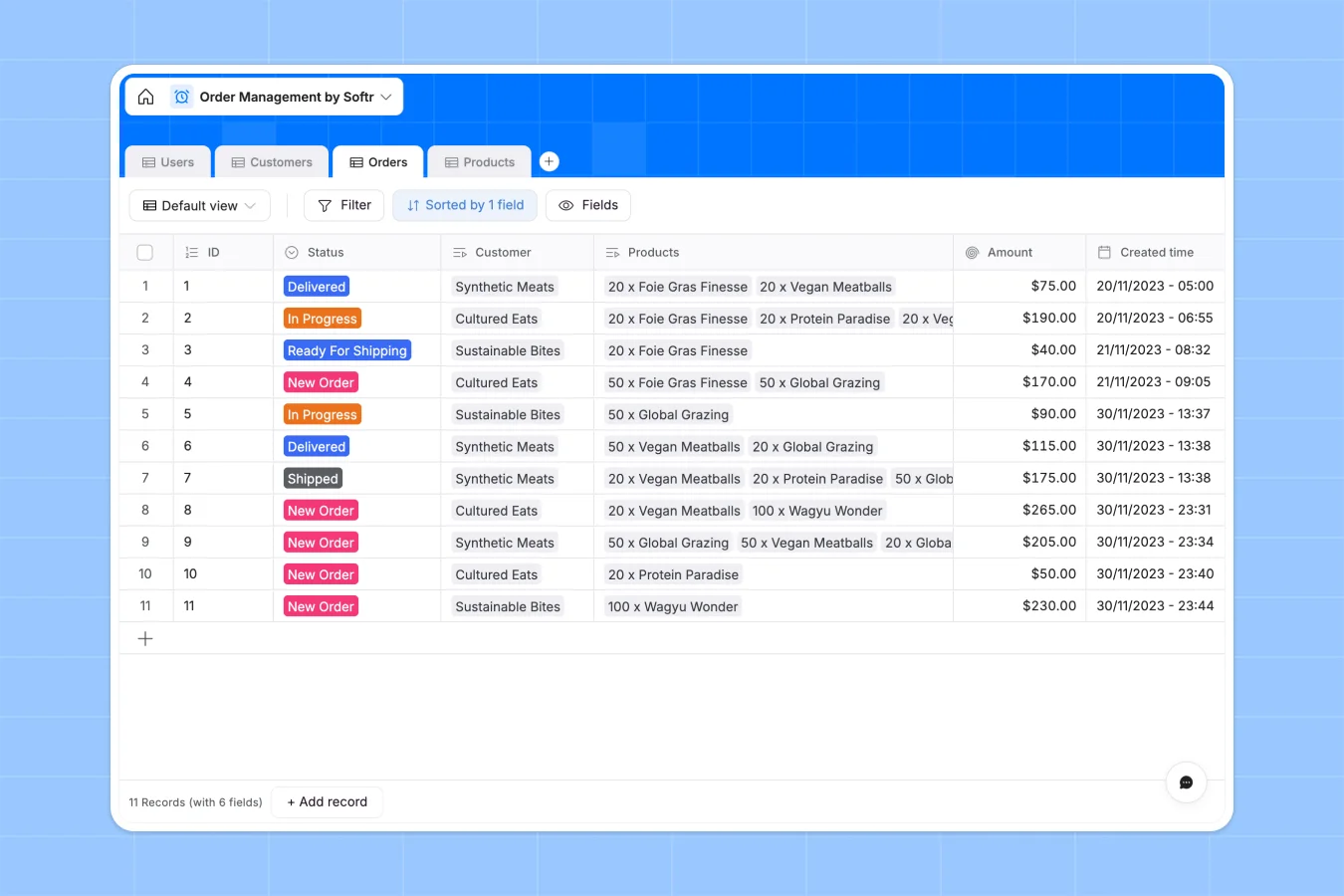
This order management database tracks orders from creation through delivery, connecting customers, products, and order status in one structured system. It eliminates scattered tracking across multiple sheets and provides real-time visibility into order fulfillment.
The database includes four connected tables: Orders (with auto-generated IDs and status tracking), Customers (with contact information and company details), Products (with inventory levels and pricing), and Users (with roles like Sales Representative, Warehouse Manager, and Customer). Orders automatically calculate total amounts by summing linked product prices through rollup fields, while products track order counts to show demand.
Related records connect customers to their orders, orders to their products, and users to their companies—creating a complete view of your order workflow without fragile formulas or manual updates.
Why choose an order management database over Google Sheets
Google Sheets struggles with order management because tracking orders, customers, and products requires multiple sheets with complex VLOOKUPs that break when data changes. As order volume grows, navigation becomes difficult and data integrity suffers from mixed column types and lack of structure enforcement.
The power of Softr Databases
Softr Databases enforce structure through proper column types—autonumber for order IDs, currency for pricing, created-at timestamps, and select fields with predefined status values. Instead of fragile VLOOKUP formulas, native related records connect orders to customers and products, while rollup fields automatically calculate order totals and product demand. Following the one table = one object principle (Orders table for orders, Customers table for customers, Products table for products) makes your data app-ready and eliminates the spreadsheet pattern of creating duplicate tables just to filter or save different views.
Core features and functionality
The database uses autonumber fields to generate unique order IDs automatically, status select fields to track fulfillment stages (New Order → In Progress → Ready For Shipping → Shipped → Delivered), and rollup calculations that sum product prices for order totals without manual formulas. Lookup fields pull customer contact details directly from related user records, while related records between Orders, Customers, and Products maintain connections that update automatically when data changes—no broken references or manual updates required.
This relational structure scales effortlessly as order volume increases, supports API access for automated workflows, and provides a solid foundation for building customer portals or internal management apps with proper permissions.
-
Users
Manage access for staff and customers with specific roles and contact info
-
Customers
Store client company details including locations, contacts, and order history
-
Orders
Track transaction lifecycles from submission to delivery with status updates
-
Products
Monitor item pricing and inventory levels while calculating purchase frequency
Who is this order management database for
This database is designed for businesses that need structured order tracking beyond spreadsheet limitations:
- E-commerce businesses: Track orders, inventory levels, and customer information in one connected system.
- Wholesale distributors: Manage customer accounts, order status, and product catalog with automatic calculations.
- Fulfillment teams: Monitor order progress from creation through delivery with clear status visibility.
- Sales operations: Connect orders to customers and products without maintaining fragile lookup formulas.
- Growing businesses: Scale order management as volume increases without spreadsheet performance issues.
How to take it further
Customize the database
Modify the Status select field values to match your fulfillment workflow (add stages like "Quality Check" or "Awaiting Payment"), adjust the Role field in the Users table to reflect your team structure, or add custom fields like "Shipping Method" or "Order Notes" to the Orders table. Since this is a native Softr Database, editing fields and adding columns takes seconds.
Import your existing data
Bring in your current orders, customer lists, and product catalogs through CSV import for bulk uploads, or connect via API to sync order data automatically from your existing systems. This lets you transition to a structured database without starting from scratch.
Build an app on top
Build a customer portal where clients can view their orders and track status in real time, or create an internal tool where your warehouse team updates fulfillment stages and sales reps access customer order history. Full-stack apps in Softr combine your database with an interface builder and workflows—all connected seamlessly.
With users and permissions, you can show customers only their orders, let warehouse managers update status fields, and give sales reps read-only access to all customer data. A well-structured order database with proper relationships between Orders, Customers, and Products makes building these interfaces straightforward—the relational foundation is already in place.
-
1
-
2
-
3
-
4
Frequently asked questions
-
What is an order management database?
-
Why use a no-code database to build an order management system?
-
How can AI help managing order data?
-
Can I build an app with this order management database?
-
Is this order management database free?
-
How is an order management database different from Google Sheets?
Start building today. It's free!
Build and launch your first app in under 30 minutes.