


Overview
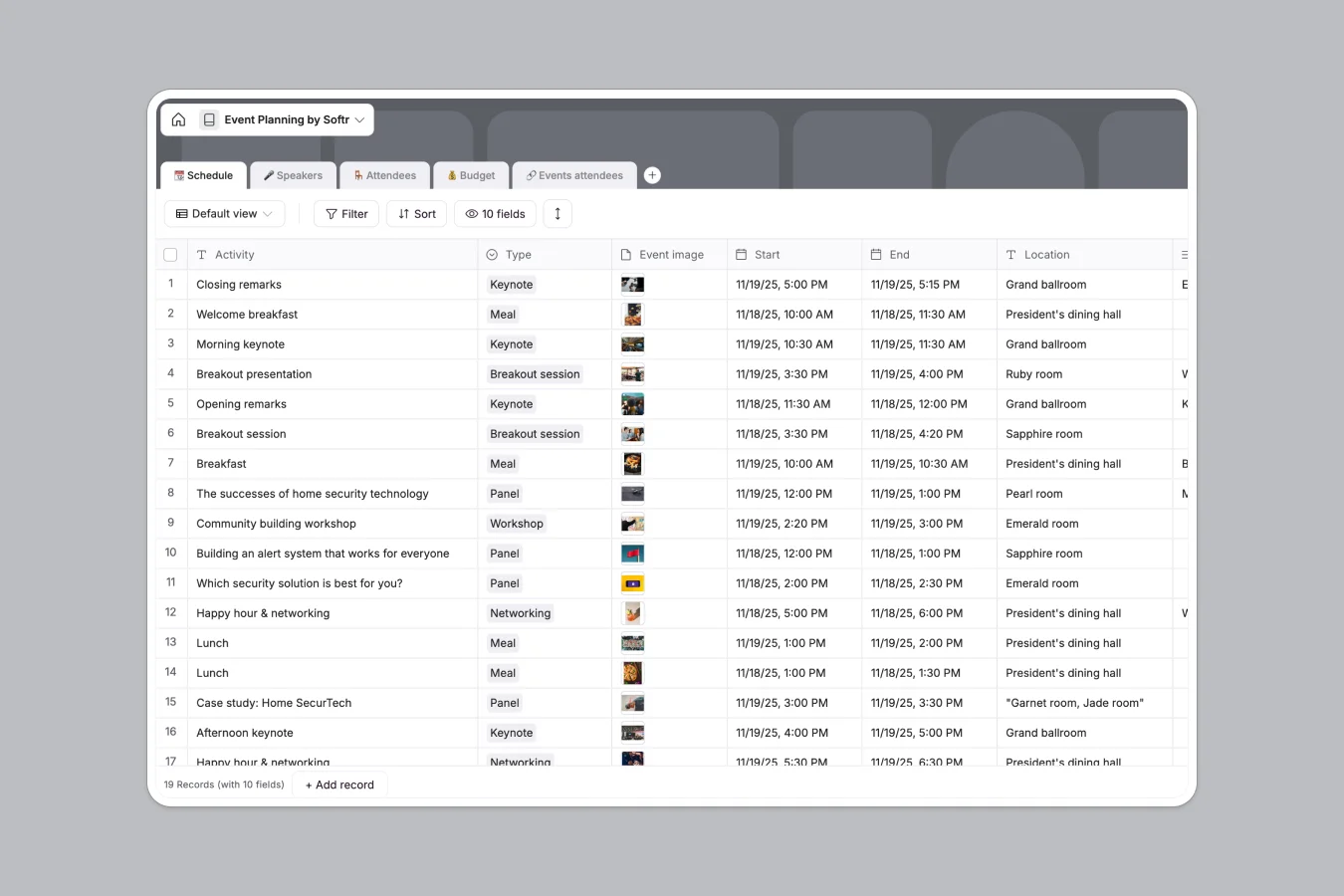
This Event Planning database centralizes everything needed to run successful events: schedules with start/end times and locations, speaker profiles with confirmation status and materials, attendee records with registration types, and budget tracking with automated cost calculations. Instead of juggling multiple Google Sheets tabs with manual updates, you get a relational system where speakers connect to their scheduled sessions, attendees link to the activities they're registered for, and budget items automatically calculate total costs against estimated amounts.
The database is built around five connected tables: Schedule tracks activities with types (keynote, panel, workshop, networking) and timing, Speakers stores presenter details with confirmation status and slides, Attendees manages registrations with profile information, Budget monitors spending with formulas that flag over-budget items, and Events attendees acts as a junction table connecting attendees to specific schedule items. These relationships mean updating a speaker's session automatically reflects in the schedule, and tracking who's registered for which activities happens through native record links—not error-prone cell references.
Why choose an Event Planning database over Google Sheets
Google Sheets forces event organizers to create multiple tabs for schedules, speakers, and attendees because filtering views and managing relationships becomes unwieldy as events grow. Columns often mix data types—dates alongside comments, numbers next to text—making it difficult to enforce consistency. VLOOKUPs break when you reorganize, and tracking which speakers are confirmed for which sessions requires constant manual updates across tabs.
The power of Softr Databases
Softr Databases enforce column types—datetimes for schedules, currency for budgets, checkboxes for confirmations—preventing the data inconsistency that plagues spreadsheets. Related records replace fragile VLOOKUPs: speakers link directly to their scheduled sessions, attendees connect to activities through a junction table, and lookups pull speaker names into schedules automatically. This relational structure follows the principle of one table per object type (one for speakers, one for schedules, one for attendees), making your data app-ready and eliminating the navigation complexity of sprawling spreadsheet tabs.
Core features and functionality
The Schedule table uses datetime fields for precise timing and linked records to connect speakers to their sessions, so you always see who's speaking when. The Budget table includes formulas that calculate total costs (quantity × actual cost) and flag items exceeding allocated budgets with visual indicators. The Events attendees junction table enables many-to-many relationships—one attendee can register for multiple sessions, and one session can have multiple attendees—through native database connections that update in real time as registrations change.
-
📆 Schedule
Organize event sessions with timing, locations, and linked speakers
-
🎤 Speakers
Manage guest profiles, professional bios, and presentation material
-
🪑 Attendees
Track guest registrations, company roles, and personalized access links
-
💰 Budget
Monitor event expenses by comparing estimated costs against actuals
-
🔗 Events attendees
Map specific attendees to the individual sessions they are attending
Who is this Event Planning database for
This template helps anyone coordinating multi-session events with speakers, attendees, and budget constraints:
- Event managers: Track schedules, speaker confirmations, and attendee registrations in one connected system without spreadsheet chaos.
- Conference organizers: Manage complex agendas with multiple speakers per session and see which attendees registered for which activities.
- Corporate event teams: Monitor budgets in real time with automated calculations that flag overspending before it becomes a problem.
- Community organizers: Coordinate workshops and networking sessions while keeping speaker materials and attendee information centrally accessible.
- Marketing teams: Plan multi-day events with detailed schedules, speaker bios, and registration tracking that stays accurate as plans evolve.
How to take it further
Customize the database
Modify the Type field in the Schedule table to match your event format—add values like "Registration," "Coffee break," or "Product demo" to accurately categorize activities. Adjust the attendee Type field to distinguish between VIPs, sponsors, press, or general admission. Add custom fields to track dietary restrictions, session capacity limits, or equipment requirements as your planning needs evolve.
Import your existing data
Upload speaker rosters, attendee lists, and budget line items via CSV to quickly migrate from spreadsheets or registration platforms. Use the API to sync attendee data automatically from ticketing systems or CRM tools, ensuring your event database stays current without manual updates.
Build an app on top
Once your data is structured, create attendee portals where registrants view personalized schedules, access speaker materials, and update their profiles—or build internal dashboards for event staff to check speaker confirmations and monitor budget status in real time. With Softr's interface builder, you can design full-stack apps that connect directly to this database, with permissions controlling who sees what: attendees view only their registered sessions while admins manage the entire event. Because your database already enforces relationships between speakers, schedules, and attendees, building interfaces that display the right information to the right people becomes straightforward—no complex queries or fragile formulas required.
-
1
-
2
-
3
-
4
Frequently asked questions
-
What is an event planning database?
-
Why use a no-code database to build an event planning system?
-
How can AI help managing data for event planning?
-
Can I build an app with event planning database?
-
Is this Event Planning database free?
-
How is an Event Planning database different from Google Sheets?
Start building today. It's free!
Build and launch your first app in under 30 minutes.