


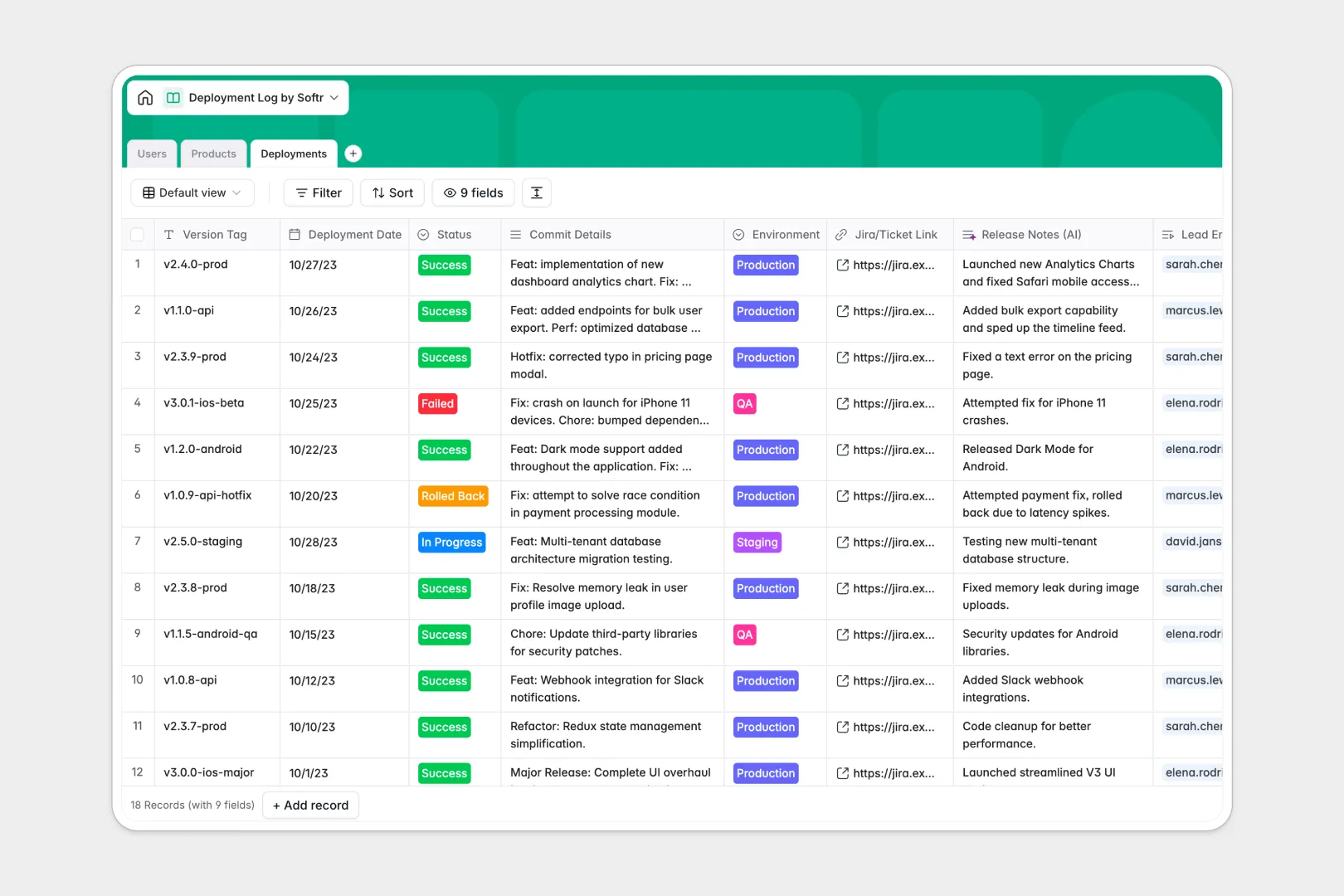
Your Deployment Log database at a glance
This template tracks every code push, version tag, and rollout status in one structured place. It gives your engineering team full visibility into what shipped and when.
It natively connects Users, Products, and Deployments through relational tables. You can instantly see who led a release, which environment it hit, and link directly to Jira tickets.
Built-in AI automatically drafts user-friendly release notes from your Git commit details. It can even research a repository URL online to generate a tech stack overview automatically.
Why a deployment log gets messy in Google Sheets
Tracking daily releases, rollbacks, and staging environments in a spreadsheet quickly turns chaotic. Rows are easily deleted, hidden commit details are hard to read, and tagging engineers relies on manual data entry.
What a structured database changes
A true database enforces clear column types so your data stays clean as your team scales. Statuses remain strict dropdowns, dates format correctly, and deployments link directly to the right product.
You never have to copy-paste names or deal with broken VLOOKUPs just to count total deployments. This absolute reliability is exactly what Softr Databases are designed for.
What you can do with this template
You can instantly log new releases while automatically tracking the last deployment date and total count per product. The strict database formatting means you can filter by target environments flawlessly every time.
Because it includes Database AI agents, the template natively translates technical commit histories into digestible summaries for non-technical stakeholders. It provides a production-ready logging system from day one.
-
Users
Manage team members with roles and track their individual deployment history
-
Products
Catalog microservices while using AI to automatically generate tech stack overviews
-
Deployments
Log code releases and utilize AI to generate user-friendly release notes from commits
Who is this Deployment Log database for
This template gives technical teams the reliable structure needed to maintain deployment velocity securely.
- DevOps Engineers: Monitor staging and production rollouts clearly without chasing down developers.
- Engineering Managers: Track total deployments and review what went into recently successful or failed builds.
- Product Managers: Read AI-generated release notes without needing to decipher raw engineering commit details.
- Developers: Log Jira tickets, environments, and version tags in seconds with a clean format.
How to take it further
Start customizing the database strictly to match your internal release cadence. You can easily add new environments to your select fields or expand the user roles.
Next, import your historical deployment data effortlessly via a quick CSV upload. If your team uses pipelines, you can connect the Softr API to automatically push new deployment records whenever a build finishes.
When you are ready to share this data cleanly, use the interface builder to create an internal portal. This lets stakeholders view release summaries without touching the raw database.
By configuring exact users and permissions, you can ensure only DevOps can manually mark a deployment as "Rolled Back". Starting with a structured foundation makes building these custom internal tools incredibly fast.
-
1
-
2
-
3
-
4
Frequently asked questions
-
What is a deployment log database?
-
Why use a no-code database to build a deployment tracking system?
-
How can AI help managing data for deployments?
-
Can I build an app with this deployment log database?
-
Is this deployment log template free?
-
How is a deployment database different from a deployment log Google Sheets template?
Start building today. It's free!
Build and launch your first app in under 30 minutes.