


Overview
This Business Contacts Database helps you maintain a complete directory of professional relationships—contacts linked directly to their companies, with AI agents that enrich your data automatically. Track prospects, clients, partners, and vendors with proper context about where you met them, their role, and their organization.
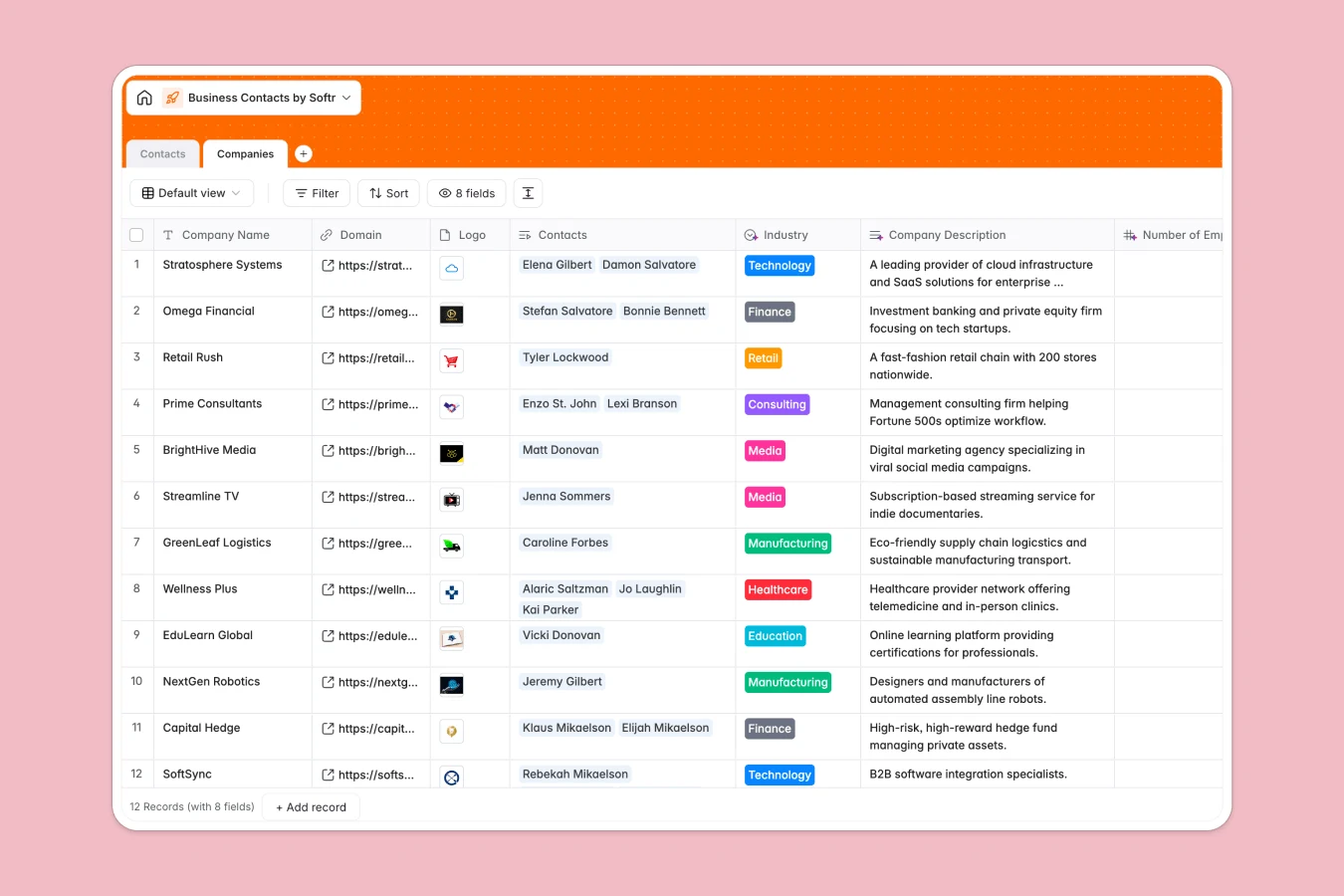
The database contains two connected tables: Companies stores business information (domain, logo, industry, description, employee count, headquarters), while Contacts holds individual details (name, email, job title, phone, LinkedIn, meeting context, notes). Each contact links to one company, and each company displays all its associated contacts—creating a true relational structure that scales as your network grows.
AI agents handle time-consuming research tasks: they categorize company industries, search the web for company descriptions and employee counts, identify headquarters countries, and suggest personalized icebreakers based on contact context. This automation reduces manual data entry and keeps your business intelligence current.
Why choose a Business Contacts database over Google Sheets
Google Sheets forces you into awkward workarounds when managing contacts and companies—either cramming everything into one bloated table or creating fragile links between separate sheets that break easily.
The power of Softr Databases
Softr Databases use native relational connections that Google Sheets can't match. Instead of maintaining multiple columns for contacts within a company table (which doesn't scale) or building complex VLOOKUP formulas that break when data shifts, you create clean relationships: one Contacts table, one Companies table, properly linked. The database enforces column types—emails stay emails, phone numbers stay formatted correctly, and dates remain consistent. You can instantly see all contacts at a company, pull insights like contact counts through rollups, and filter by industry through lookups—all without fragile formulas. This structure isn't just cleaner; it's app-ready, meaning you can build interfaces with proper permissions on top of it.
Core features and functionality
The database tracks contact types (Prospect, Client, Partner, Vendor, Previous Client) so you know relationship status at a glance, and captures context like where you met someone—details that matter for authentic outreach. Database AI agents automatically research company information through web searches and generate personalized icebreaker suggestions based on your notes and meeting context, turning your contact list into actionable business intelligence. The linked structure means you can segment by industry, analyze which companies have multiple contacts, and maintain clean records that actually support your networking strategy.
-
Companies
Manage business entities with AI-driven industry, employee, and location data
-
Contacts
Store individual contacts with AI-generated icebreaker suggestions for outreach
Who is this Business Contacts Database for
This database works for anyone building and maintaining professional relationships:
- Sales teams: Track prospects and clients with full company context and relationship history.
- Business development: Manage partnerships and vendor relationships with organized contact information.
- Founders and consultants: Keep your professional network accessible with AI-powered insights for better outreach.
- Event organizers: Store connections made at conferences with context about where and when you met.
- Recruiters: Maintain candidate databases linked to their current and previous companies.
How to take it further
Customize the database
Edit the Contact Type select field to match your business model—add "Investor," "Mentor," "Press," or whatever categories matter to your work. Modify the Industry choices in the Companies table to reflect the sectors you actually work with, and add custom fields like "Last Contact Date" or "Deal Stage" to track relationship momentum.
Import your existing data
Upload your current contact lists via CSV—map your spreadsheet columns to the database fields and import everything at once. For ongoing synchronization, use the API to connect your CRM or email tools so contact information updates automatically without manual data entry.
Build an app on top
A well-structured contacts database becomes far more valuable when you build an interface on it. Using Softr's interface builder, create a team-facing app where sales reps can browse contacts, filter by industry or type, and add meeting notes from their phones. Set up permissions so each team member sees relevant contacts while keeping sensitive client information restricted. You could build a client portal where partners access shared contacts, or an internal directory where everyone can search for "who knows someone at X company." Because your database already has proper relational structure—contacts linked to companies with enforced data types—building these interfaces takes hours, not weeks.
-
1
-
2
-
3
-
4
Frequently asked questions
-
What is a business contacts database?
-
Why use a no-code database to build a business contacts system?
-
How can AI help managing data for business contacts?
-
Can I build an app with a business contacts database?
-
Is this Business Contacts Database free?
-
How is a Business Contacts database different from Google Sheets?
Start building today. It's free!
Build and launch your first app in under 30 minutes.