


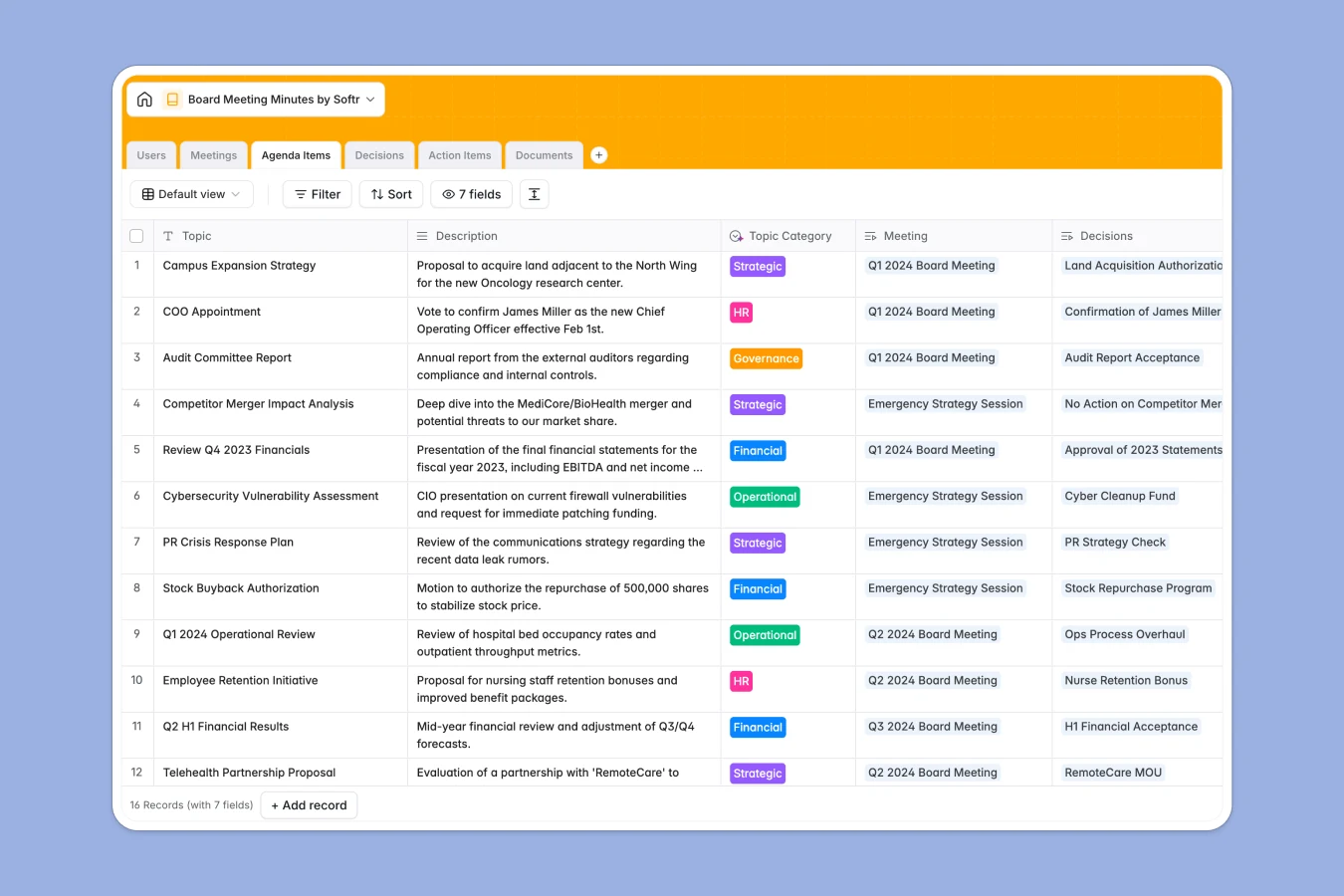
Your Board Meeting Minutes database at a glance
This template acts as a secure, centralized hub to manage your board's schedule, records, and resolutions. It replaces disconnected documents with a clean system where meeting minutes, documents, and action items stay perfectly organized.
It uses dedicated tables for Meetings, Agenda Items, Decisions, and Documents that connect to each other seamlessly. When you pull up a past meeting, you instantly see who attended, what documents were reviewed, and what resolutions were passed without hunting through folders.
Built-in AI automatically drafts formal legal wording for approved resolutions and summarizes raw meeting notes into polished executive summaries, saving hours of administrative work.
Why board meeting minutes get messy in Google Sheets
Tracking formal board proceedings in a spreadsheet quickly becomes chaotic when you need to attach bulky board packs or link specific decisions to follow-up tasks.
What a structured database changes
Unlike traditional spreadsheets, a database enforces reliable structure for your critical corporate records. Every column has strict rules, meaning your formal resolutions dictate clear actions rather than getting lost in endlessly scrolling rows.
You can link specific documents directly to the relevant meeting, or tie an assigned action item directly back to the agenda topic it originated from. This is exactly what Softr Databases are designed for, keeping complex reporting perfectly connected.
With structured data, there is no risk of someone accidentally deleting a row of critical notes or breaking fragile VLOOKUP formulas. Your history stays intact as your organization scales.
What you can do with this template
Easily categorize agenda items into strategic or operational topics, while keeping official decisions clearly documented alongside their voting outcomes.
You can also leverage Database AI agents to clean up raw notes and categorize meeting items instantly. Just start logging your board data, and watch it turn into a professional, audit-ready log.
-
Users
Directory of board members and staff with AI-enriched professional bios
-
Meetings
Schedule board sessions and generate AI-powered professional minute summaries
-
Agenda Items
Manage discussion topics using AI to auto-classify items into core categories
-
Decisions
Record resolutions and outcomes with AI-generated formal legal phrasing
-
Action Items
Track follow-up tasks with concise titles generated automatically by AI
-
Documents
Centralize board packs and financial reports for easy meeting reference
Who is this Board Meeting Minutes database for
This template gives corporate leaders and administrators a reliable foundation for governance.
- Corporate Secretaries: Ensure all formal resolutions are accurately drafted, indexed, and easy to retrieve for audits.
- Board Chairs: Maintain clear visibility over strategic agenda items and track progress on assigned tasks between sessions.
- Executive Assistants: Combine schedules, executive bios, and board packs in one place so attendees are always prepared.
How to take it further
You can customize this database in seconds to match your specific governance requirements. Add new voting outcome options to the Decisions table or tweak the AI prompts to match your company's preferred legal phrasing.
If you have historical records, easily import your past minutes and directories via CSV or connect via API. This ensures your new system provides immediate value with a complete historical archive ready from day one.
When your team is ready, you can transform this database into a secure board portal. By building an app, you give board members a custom intuitive dashboard to review upcoming packs and track their own tasks without accessing the underlying tables.
With robust users and permissions, you can ensure executives only see finalized executive summaries while administrators can edit raw meeting notes. Starting with a structured database makes building this secure corporate portal entirely effortless.
-
1
-
2
-
3
-
4
Frequently asked questions
-
What is a board meeting minutes database?
-
Why use a no-code database to build a board management tool?
-
How can AI help managing data for board meetings?
-
Can I build an app with this meeting minutes database?
-
Is this Board Meeting Minutes database free?
-
How is a board minutes database different from Google Sheets?
Start building today. It's free!
Build and launch your first app in under 30 minutes.