


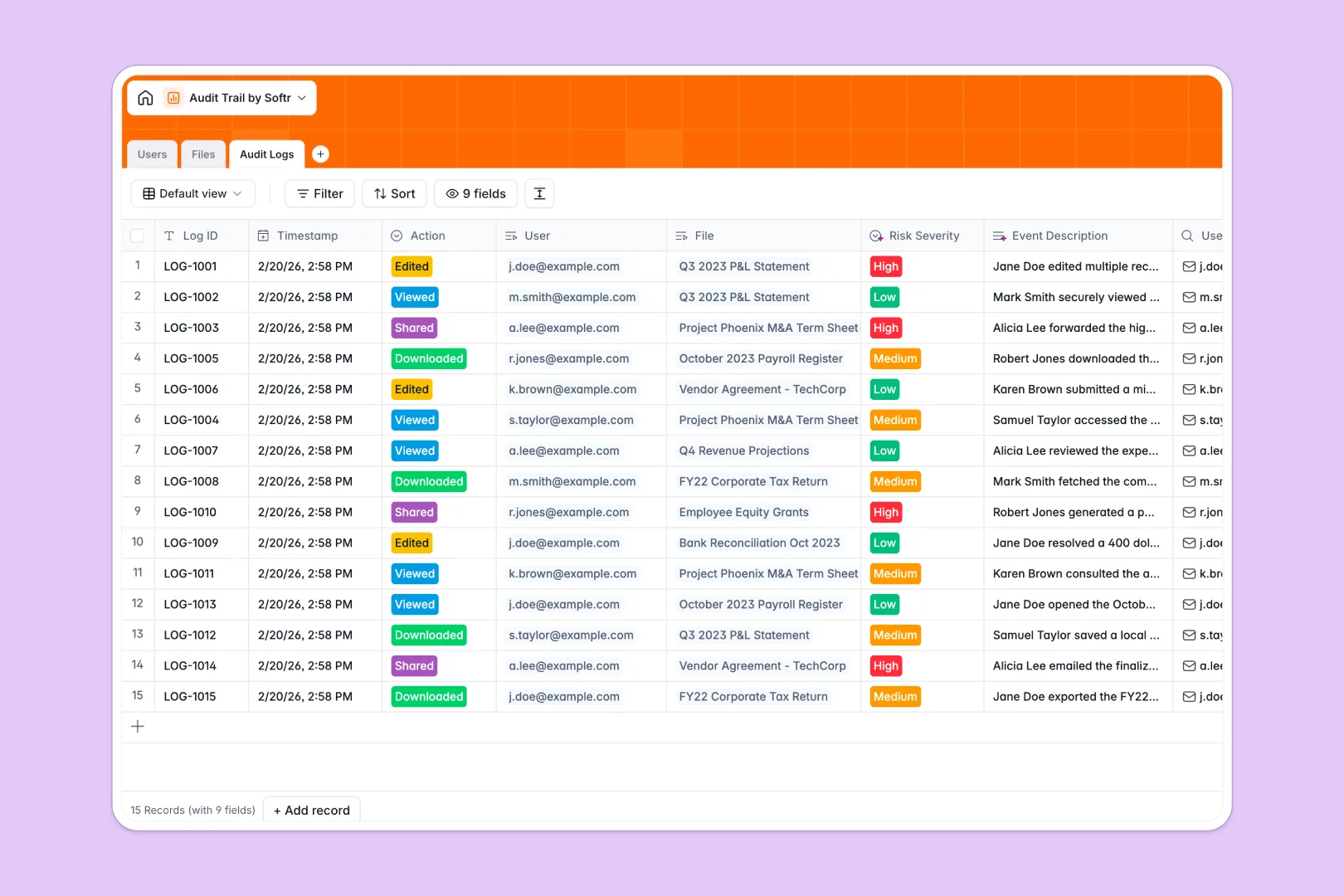
Your Audit Trail database at a glance
This template provides a secure, centralized ledger to monitor who accesses, downloads, or edits your sensitive documents. It eliminates the guesswork of file security by automatically associating user actions with specific financial or corporate files.
The system relies on three core connected tables: Users, Files, and Audit Logs. When an employee interacts with a restricted file, the database links the user's role and email directly to the file and stamps the exact action into a continuous ledger.
Built-in AI automatically drafts intuitive file descriptions based on document types to keep records clean. It also instantly writes clear narrative event summaries and scores the risk severity for every single logged action without manual review.
Why tracking audit trails in Google Sheets breaks down
When managing sensitive corporate data, relying on basic spreadsheets is an immense compliance risk. Rows can be accidentally deleted, file attachments get separated, and manually typing out who edited what is tedious and prone to human error.
What a structured database changes
A true relational system locks down your structure so historical logs stay intact and undeniable. Instead of messy VLOOKUPs, your personnel directory naturally links to the files they own and the exact actions they take.
Dates, user roles, and attachments are strictly formatted so data never gets overwritten or typed incorrectly as your team scales. This is exactly what Softr Databases are designed for, giving you a scalable, ironclad foundation as your operations grow.
What you can do with this template
You can instantly track exactly when a confidential tax record is viewed or downloaded by a specific department member. Every single action is securely timestamped, categorized, and linked back to the exact user instantly.
Thanks to Database AI agents, the system will autonomously evaluate the security risk level of an event as Low, Medium, or High. You get an immediate, ready-to-use compliance ledger that requires absolutely zero technical setup.
-
Users
Manage personnel directory with roles, departments, and file ownership data
-
Files
Store corporate records using AI to generate summaries of sensitive documents
-
Audit Logs
Track file activity with AI-narrated event logs and risk severity analysis
Who is this Audit Trail database for
This system is built for teams that handle sensitive information and need strict visibility over document security.
- Compliance Officers: Maintain a continuous, tamper-proof record of who accesses restricted documents.
- IT Administrators: Track downloads, edits, and shares across departments to spot risky behavior quickly.
- Finance Managers: Securely store tax records and payroll files while logging every internal interaction automatically.
- HR Leads: Monitor access to confidential employee records without relying on fragile or easily deleted spreadsheets.
How to take it further
You can easily modify the database to fit your exact internal security protocols. Add new document classifications, update department lists, or tweak the AI risk assessment criteria to match your compliance policies perfectly.
Bring your historical logs in immediately with a quick CSV import to get started instantly. You can also connect via API to sync real-time user actions from your existing company software directly into the ledger.
When you are ready to scale, it is easy to build a full internal security portal right on top of this data. Using a visual interface builder, you can create employee dashboards where staff easily upload files but cannot alter historical logs.
By setting up strict users and permissions, you guarantee that only executives or admins can view high-risk audit events securely. Starting with a perfectly structured database makes launching these custom secure apps completely effortless.
-
1
-
2
-
3
-
4
Frequently asked questions
-
What is an audit trail database?
-
Why use a no-code database to build an audit logging tool?
-
How can AI help manage data for audit trails?
-
Can I build an app with this audit trail database?
-
Is this Audit Trail template free?
-
How is this database better than tracking audit logs in Google Sheets?
Start building today. It's free!
Build and launch your first app in under 30 minutes.