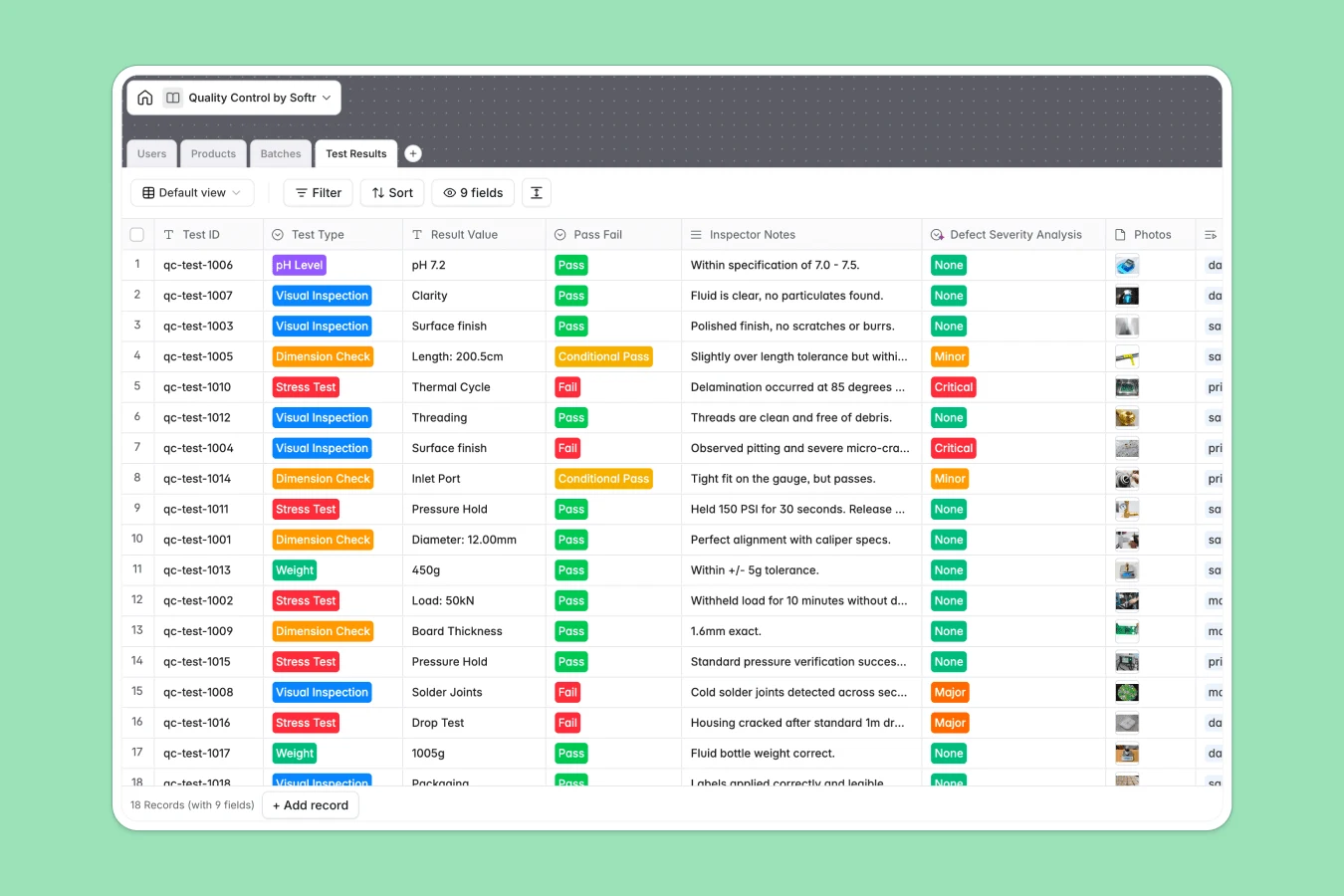
This Quality Control database tracks every inspection from production batch to final approval. It connects products, batches, test results, and inspector assignments in one structured system—eliminating the scattered spreadsheets and version control issues that plague quality teams.
The database centers on four connected tables: Products (catalog with specs and safety sheets), Batches (production runs with status tracking), Test Results (individual quality checks with pass/fail outcomes and photos), and Users (inspectors and managers). When an inspector logs a test result, it automatically links to the correct batch and product, with rollups showing total tests performed and batch-level status visibility.
Excel quality logs typically sprawl across multiple tabs and files—one sheet per batch, another for test results, separate trackers for inspectors. As production scales, navigation becomes impossible and formulas break. Data integrity suffers when inspectors enter mixed formats in the same column (dates as text, comments in number fields).
A quality control database enforces structure that Excel cannot: test types are validated select fields, pass/fail outcomes are standardized, dates auto-populate. Related records replace fragile VLOOKUPs—each test result connects directly to its batch and inspector, with lookups pulling product specs automatically. Rollups count total tests per batch in real time, no manual formulas required. The principle of one table per object type (Products, Batches, Test Results, Users) makes the system scalable and app-ready.
This template captures the full inspection workflow: Products table stores SKUs and specifications, Batches track production runs with quarantine/released/rejected status, Test Results log individual checks with photos and inspector notes. The system tracks test types (visual inspection, pH level, weight, dimension, stress test), defect severity, and maintains compliance documentation like certificates of analysis—all with proper relational structure that makes audits and trend analysis straightforward.
Manage inspectors and managers with roles, contact info, and test history
Catalog manufactured items with technical specs and safety documentation
Monitor specific production runs and their overall quality release status
Record detailed inspection values and analyze defect severity for batches
This database is built for teams managing production quality and compliance:
Customize the database. Modify test types to match your specific quality checks—add "Moisture Content" or "Tensile Strength" to the Test Type select field. Adjust defect severity levels or batch status values to align with your quality procedures. As a native Softr Database, every field and relationship can be edited to fit your workflow.
Import your existing data. Upload historical test results via CSV to maintain continuity, or connect via API to sync data from lab equipment or existing quality systems automatically.
Build an app on top. A well-structured quality database becomes the foundation for a full production quality system. Use Softr's interface builder to create inspector portals where team members log test results directly, manager dashboards showing batch status and failure trends, and client-facing quality reports. Set permissions so inspectors only see assigned batches, managers view all production data, and clients access their specific batch certificates. Full-stack apps in Softr connect Database + Interface + Workflows seamlessly—your structured quality data makes building these apps straightforward, turning a compliance tracker into an operational quality management system.
A quality control database tracks inspections, test results, and compliance records for manufactured products. It connects products to production batches, individual quality checks, and inspector assignments—providing traceability from raw materials to final approval while maintaining audit-ready documentation.
No-code databases let quality teams deploy production-ready systems in hours, not months of custom development. You maintain full control over quality procedures and data structure without IT dependencies, making it easy to adjust test types, add new compliance fields, or modify workflows as regulations change.
AI Database co-builder follows your prompts to structure quality tables and write formulas for defect calculations. Database AI agents can automatically categorize defect types from inspector notes, extract measurements from test photos, or summarize batch failure patterns. Set agents to run when test results are logged or batches reach specific statuses, ensuring consistent data processing without manual review.
Yes, using Softr's interface builder that connects directly to this database. Build inspector portals for logging test results with photo uploads, manager dashboards showing batch status and failure trends, and client portals displaying certificates of analysis. Set permissions to show inspectors only their assigned batches, give managers full production visibility, and let clients access quality data for their orders—ensuring everyone sees the right information.
Yes, free to get started. Databases are included in Softr's free plan, with higher-tier plans offering increased database limits as your quality operations scale. All plans include unlimited collaborators, so your entire quality team can access the system.
Excel quality trackers become unmanageable as batches accumulate—multiple tabs per product, broken formulas linking test results to batches, and mixed data types in columns (dates as text, comments in measurement fields). Databases enforce structure: test types are validated select fields, batch connections use native relations instead of fragile VLOOKUPs, and rollups automatically count tests per batch. The relational structure makes trend analysis and compliance audits straightforward instead of requiring complex spreadsheet archaeology.