


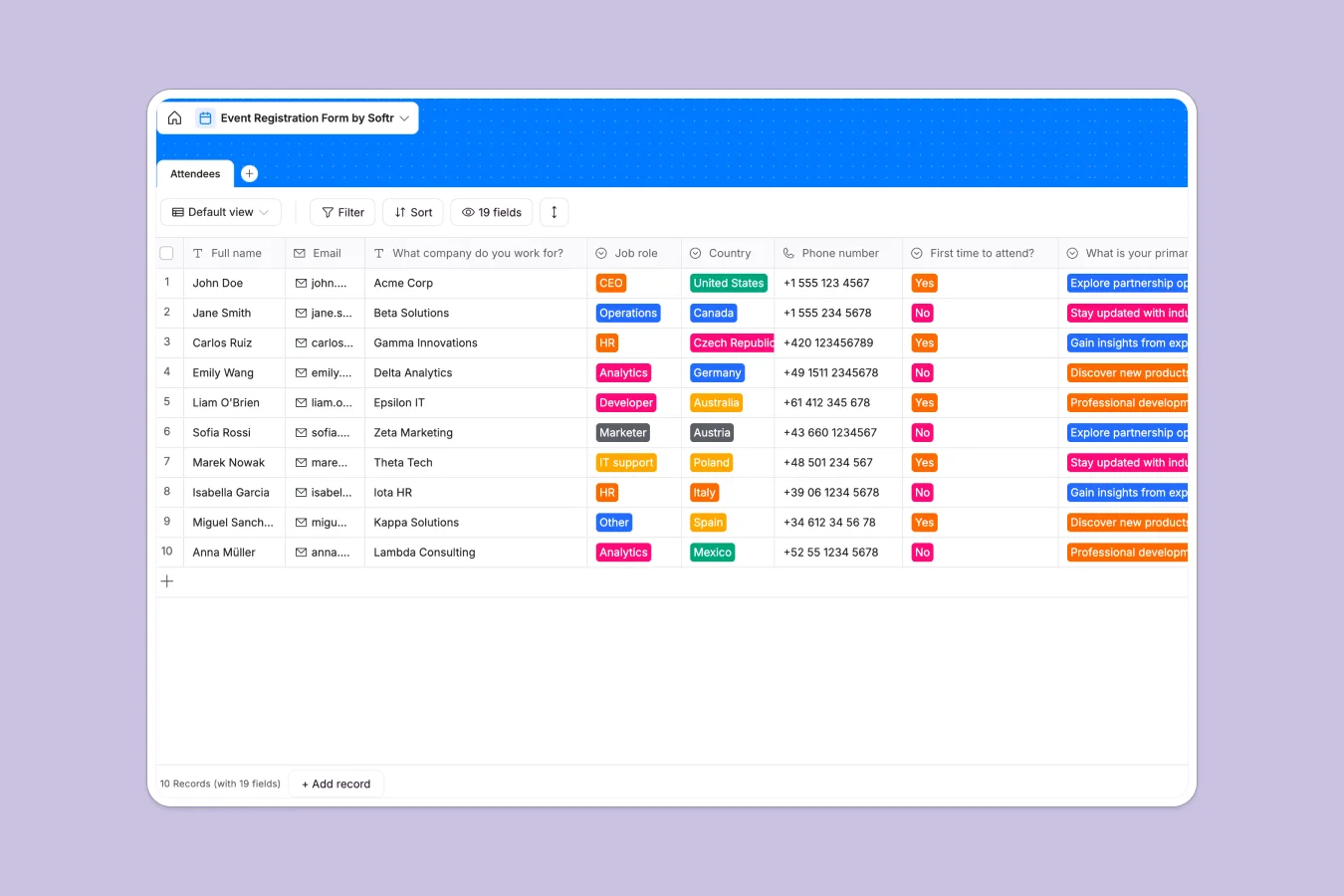
Your Event Registration database at a glance
This template gives you a centralized, ready-to-use system to collect and organize every attendee detail. It immediately replaces scattered files with a clean, single source of truth.
It features a comprehensive Attendees table that captures everything from basic contact info and job roles to specific meal choices, T-shirt sizes, and accommodation needs.
Why event registration gets messy in Excel
Tracking hundreds of event attendees in spreadsheets quickly turns chaotic. You end up with mixed data formats, accidentally deleted rows, and no secure way to collect profile pictures or dietary restrictions.
What a structured database changes
In a database, every column is strictly defined so drop-downs stay consistent and attachments like headshots are stored safely. This is exactly what Softr Databases are designed for.
You never have to worry about broken formulas or text shoved into date columns. Your attendee list scales cleanly, whether you have fifty guests or five hundred.
What you can do with this template
Instantly see who needs a hotel room or requires vegetarian meals by filtering predefined selection fields.
You can safely share this structure with staff members to check in guests without risking the integrity of your core data.
-
Attendees
Manage guest registrations with contact details, logistics and meal choices
Who is this Event Registration database for
This system is built for teams coordinating logistics who need absolute precision.
- Event Managers: Track capacities, accommodations, and dietary needs effortlessly.
- HR Teams: Organize internal company offsites, employee travel, and SWAG distribution.
- Marketing Leaders: Seamlessly capture attendee contexts, job roles, and networking consent.
How to take it further
Customize the drop-down options to perfectly match your event's meal choices, hotel partners, or specific job roles. Adding or modifying columns only takes a few clicks.
Import your past attendee lists via CSV directly into the table. This instantly populates your new system and gives you a usable starting point.
When your team is ready, you can transform this data into a complete event portal. Connecting a structured database to a front-end makes app development incredibly fast.
You can let attendees log in to update their own profiles, while staff members manage the overarching logistics in one shared space.
-
1
-
2
-
3
-
4
Frequently asked questions
-
What is an event registration database?
-
Why use a no-code database to build an event registry?
-
How can AI help managing data for event registrations?
-
Can I build an app with an event registration database?
-
Is this Event Registration template free?
-
How is this database different from tracking events in Excel?
Start building today. It's free!
Build and launch your first app in under 30 minutes.