


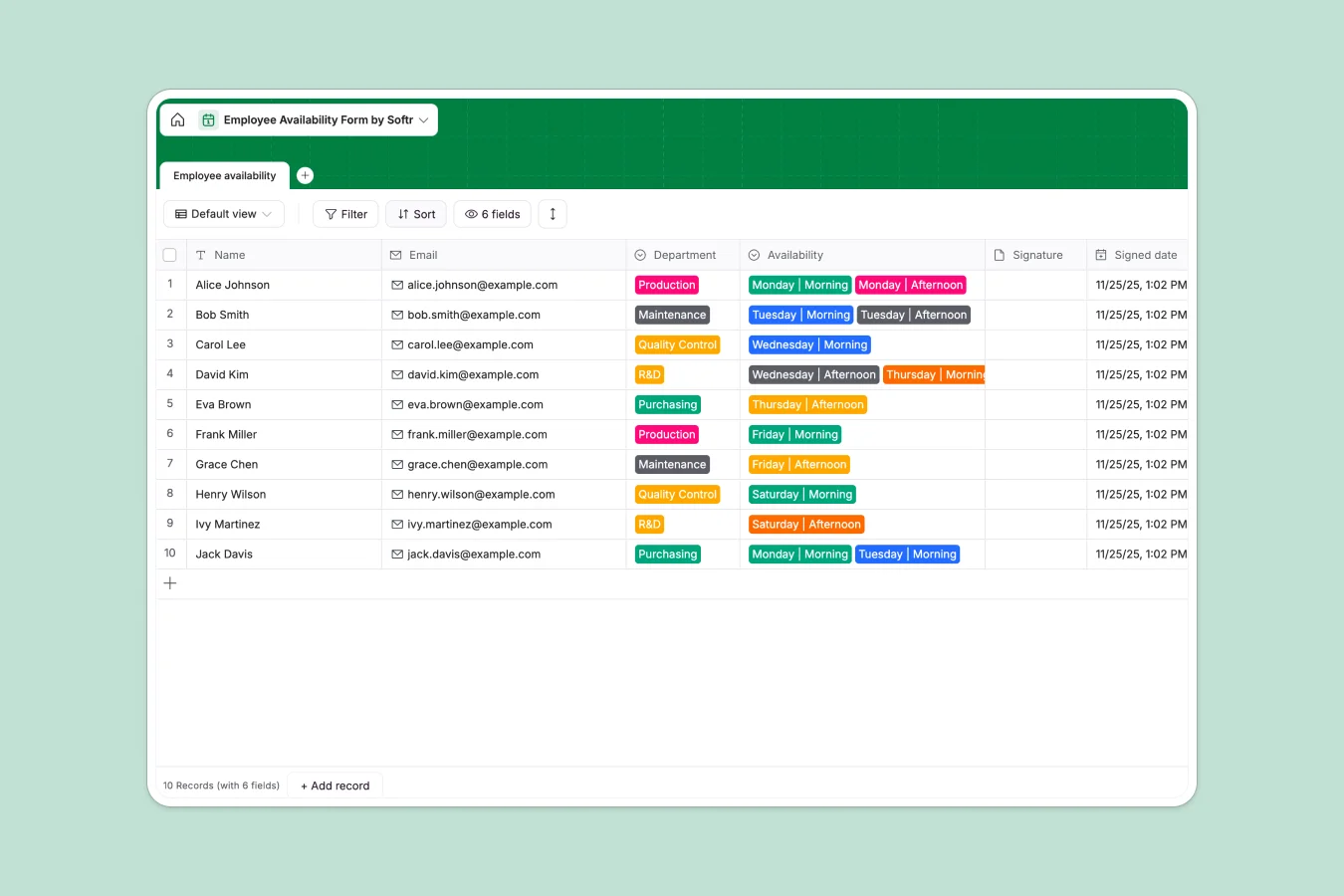
Your Employee Availability Database at a glance
This template replaces manual spreadsheets with a clean, structured system to track when your team can work. Keep staff availability organized across all departments in one central place.
It includes a primary table for logging team members, their departments, specific shift availabilities, and attached signatures. Because fields are strictly typed, emails stay as emails and dates log automatically when records are created.
Why managing employee availability gets messy in Excel
When you use manual spreadsheets to track shifts, things break down quickly. People overwrite each other's schedules, column formatting gets corrupted, and attaching actual signatures or shift proofs is nearly impossible in a cell.
What a structured database changes
A proper database enforces rules. Instead of typing "Morning" or "AM" randomly, staff select from strict dropdowns like "Monday | Morning", keeping your data spotless.
Handling files like signature attachments also becomes native. This is exactly what Softr Databases are designed for—you get the simplicity of a list with the reliability of real business software.
What you can do with this template
Log team member shifts instantly, categorize them by department, and auto-capture submission dates without manual entry.
Eliminate schedule conflicts by tracking exact morning and afternoon shifts per employee, keeping production and maintenance teams perfectly aligned.
-
Employee availability
Monitor staff shifts and scheduling across departments with signed confirmations
Who is this Employee Availability database for
This system is ready to use for any team lead managing shift schedules and deskless workers:
- Production managers: Track when operators are on the floor to ensure machines stay running without coverage gaps.
- Maintenance leads: Confirm individual availability for critical morning or afternoon repair shifts.
- HR departments: Collect official availability records complete with securely attached employee signatures.
How to take it further
Customize the database: You can easily tweak the dropdown fields to match your company's actual shifts or add new departments like "Logistics" in seconds. The structure is yours to edit immediately.
Import your existing data: Have an older Excel roster? Just upload a CSV, and your staff names, emails, and current departments will populate instantly.
Build a full app around it: When you're ready, you can build an employee portal using Softr's interface builder.
Instead of letting everyone see the whole database, you can set up strict users and permissions so workers only see and update their own schedule. A well-structured database makes turning lists into safe, maintainable apps effortless.
-
1
-
2
-
3
-
4
Frequently asked questions
-
What is an employee availability database?
-
Why use a no-code database to build a scheduling tool?
-
How can AI help managing data for staff availability?
-
Can I build an app with this employee availability database?
-
Is this Employee Availability Database free?
-
How is this template different from employee availability Excel sheets?
Start building today. It's free!
Build and launch your first app in under 30 minutes.