


Overview
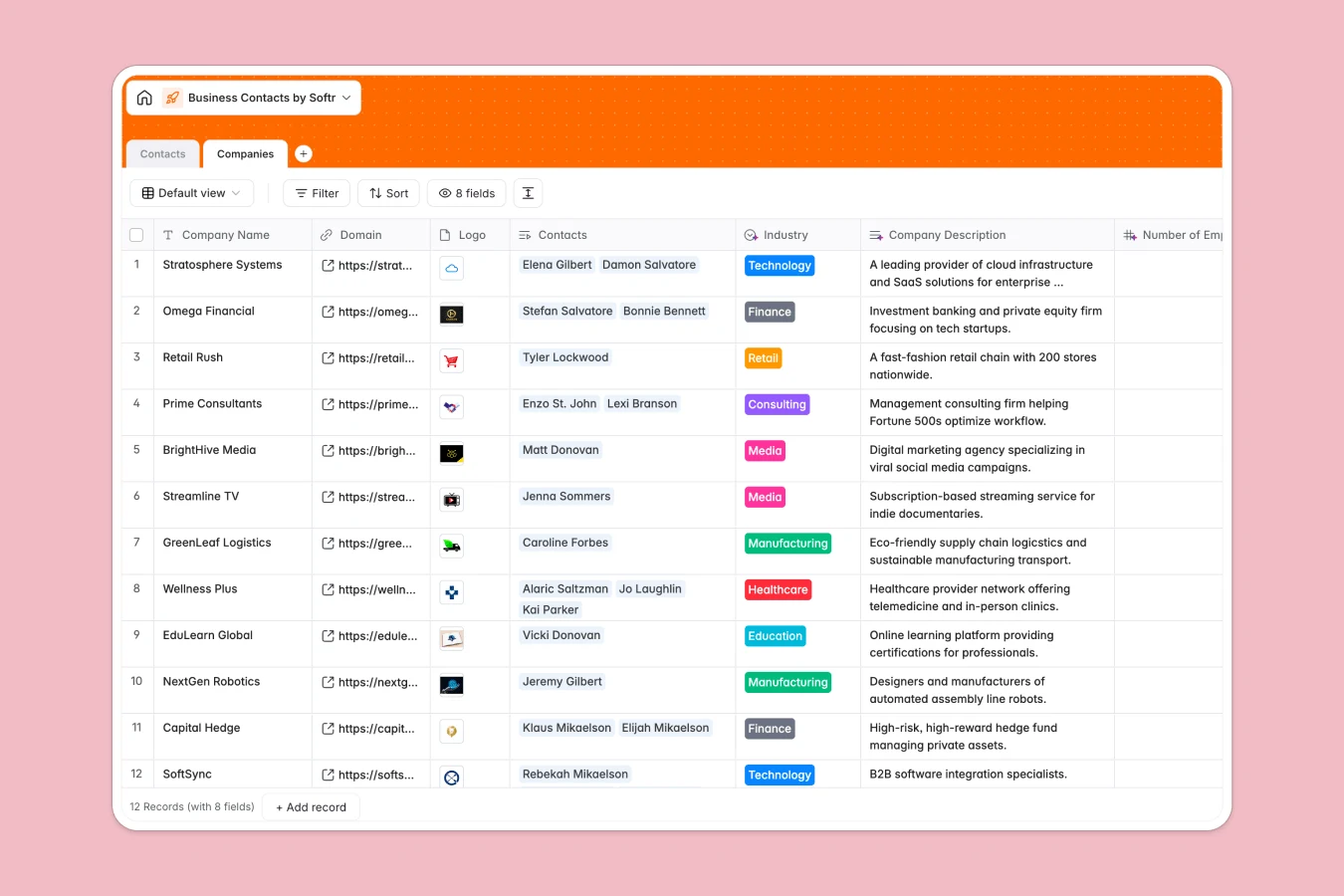
This business contacts database organizes your professional network with two connected tables: Contacts and Companies. Each contact links directly to their company, enabling you to see all relationships at a glance—who works where, which companies have multiple contacts, and how your network is distributed across industries and countries.
The Companies table stores company name, domain, logo, industry classification, employee count, headquarters country, and a description field. The Contacts table captures full name, email, job title, contact type (Prospect, Client, Partner, Vendor, Previous Client), phone number, LinkedIn profile, meeting context, and notes. A lookup field pulls industry data from the linked company automatically.
AI-powered fields minimize manual data entry. At the company level, Database AI agents categorize industry, search the web for company descriptions, find employee counts online, and identify headquarters countries. At the contact level, an AI agent suggests personalized icebreakers based on available information—making outreach more thoughtful without extra research time.
Why choose a business contacts database over Excel
Excel files become unwieldy as your network grows. You might create separate sheets for different contact types or companies, making it difficult to see connections between people and organizations. Following up means switching between tabs and manually cross-referencing information.
The power of Softr Databases
Softr Databases solve Excel's structural limitations with native relational connections. Instead of one sprawling sheet with repeated company details in every contact row, you maintain separate Companies and Contacts tables linked through related records. This structure prevents data duplication and makes insights immediate—count contacts per company with a rollup, filter by industry with a lookup, update company information once and see it reflected across all linked contacts. Column types are enforced: emails stay formatted as emails, phone numbers as phone numbers, dates as dates. No more mixed data types breaking formulas or causing confusion. API access enables automated data sync, and the structure is app-ready if you want to build interfaces for your team.
Core features and functionality
Linked records replace fragile VLOOKUP formulas—connect contacts to companies with a click, not complex cell references. Database AI agents enrich company profiles automatically by searching the web for descriptions, employee counts, and headquarters locations, then categorize industries based on findings. At the contact level, AI generates contextual icebreaker suggestions to personalize outreach. Lookups pull company data into contact records instantly, so you see industry context without switching views. The relational structure scales naturally—add hundreds of contacts without performance degradation or navigation complexity.
-
Companies
Manage client organizations with AI-automated industry and HQ data enrichment
-
Contacts
Detail professional profiles with AI-generated icebreakers for better outreach
Who is this business contacts database for
This database works for anyone managing professional relationships and needing structured, scalable contact tracking:
- Sales teams: Track prospects and clients with company context, follow-up notes, and AI-generated icebreakers for personalized outreach.
- Consultants and freelancers: Organize your network by contact type and industry, see which companies you've worked with, and maintain context for future opportunities.
- Business development professionals: Map partnerships and vendor relationships, track where connections originated, and identify companies for strategic outreach.
- Recruiters and talent teams: Maintain candidate databases linked to their companies, filter by industry or company size, and keep detailed interaction notes.
- Event organizers: Store attendee information with company affiliations, categorize by contact type, and follow up with relevant context about where you met.
How to take it further
Customize the database to match your workflow. Modify the Type select field to reflect your specific relationship categories—maybe you need "Lead," "Current Client," "Referral Source" instead of the defaults. Add custom fields like "Last Contact Date," "Deal Stage," or "Preferred Communication Channel." Adjust industry choices in the Companies table to match your target sectors. As a native Softr Database, every field and taxonomy is fully editable.
Import existing contact data via CSV for bulk uploads or connect via API to sync with your CRM or email platform automatically. This gets your current network into the structured format immediately, then AI agents can enrich company profiles without manual research.
Build an app on top for your team. A business contacts database naturally supports interface building—create an internal portal where sales reps browse contacts filtered by type or industry, add new prospects after meetings, and update deal notes in real time. Set permissions so each rep sees only their assigned contacts, or give managers full visibility across the team's network. Full-stack apps in Softr connect your database, interface, and workflows seamlessly. Because the database is already structured relationally, building the app layer becomes straightforward—the hard work of organizing your data is done.
-
1
-
2
-
3
-
4
Frequently asked questions
-
What is a business contacts database?
-
Why use a no-code database to build a business contacts system?
-
How can AI help managing data for business contacts?
-
Can I build an app with this business contacts database?
-
Is this business contacts database free?
-
How is a business contacts database different from Excel?
Start building today. It's free!
Build and launch your first app in under 30 minutes.