


Overview
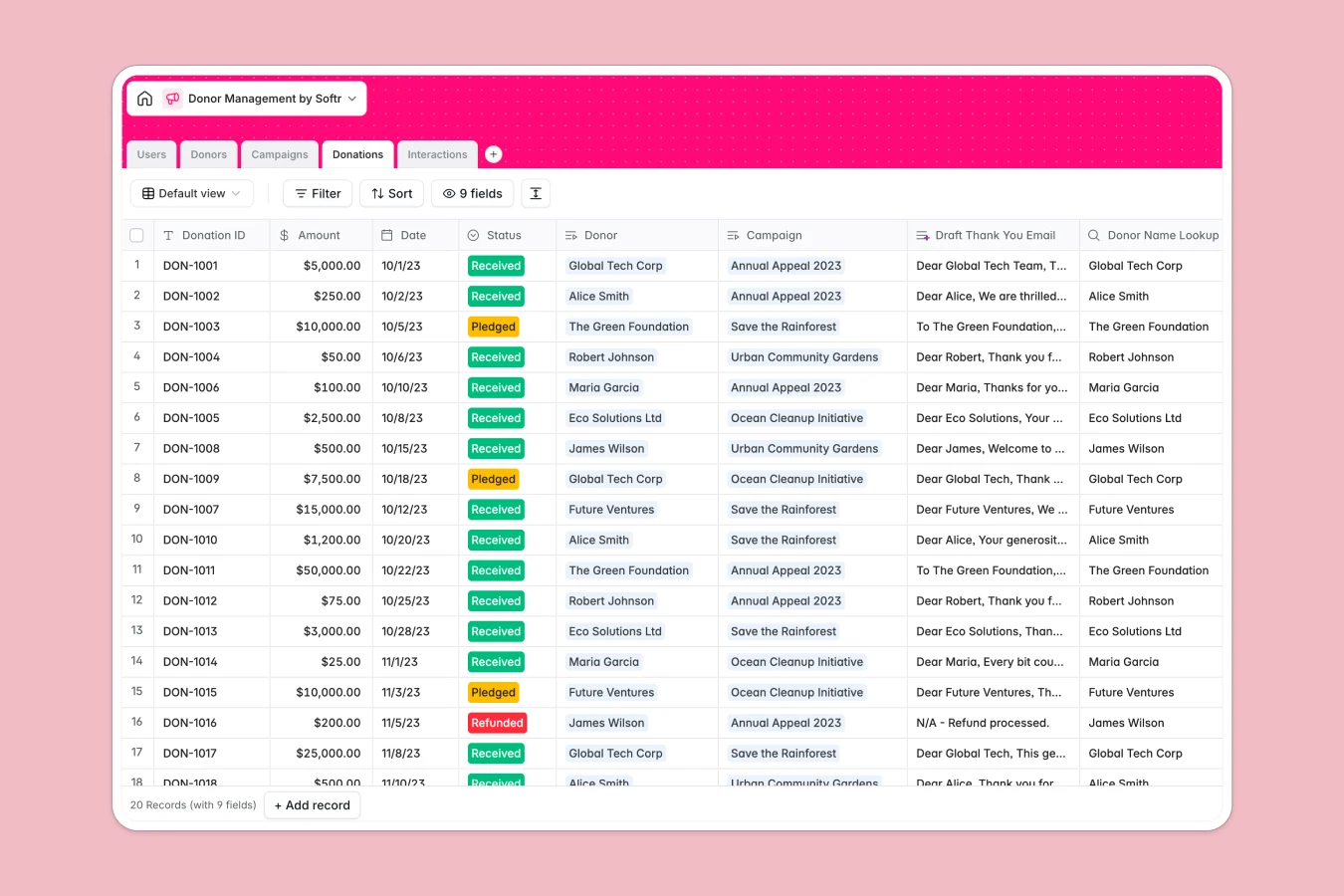
This donor management database helps nonprofits and fundraising teams organize donor profiles, track donations, manage campaigns, and log interactions in one connected system. It captures everything from individual gifts and lifetime value to campaign progress and staff communication history.
The database connects five tables: Donors store profiles with giving history and lifetime value calculations; Donations track amounts, dates, and status (pledged, received, refunded) with links to specific donors and campaigns; Campaigns manage fundraising initiatives with goal tracking and total raised rollups; Interactions log emails, calls, and meetings with sentiment analysis; Users manage staff access and track who logged which interactions. Related records and lookups connect donor profiles to their complete giving and communication history.
Database AI agents enhance this template with automated capabilities: research donors' philanthropic interests by searching their websites and public data, generate compelling campaign descriptions, draft personalized thank-you emails based on donation amounts and campaigns, and classify interaction sentiment to identify relationship health—all triggered automatically when records are added or updated.
Why use this donor management database (instead of spreadsheets)
Spreadsheets become unmanageable as donor lists grow—you end up with multiple tabs for the same donors, fragile VLOOKUPs that break when data moves, and no way to connect donations to campaigns without complex formulas.
The power of Softr Databases
Softr Databases enforce structure with proper column types for currencies, dates, and relationships, eliminating mixed data in cells. Native connections between tables replace fragile formulas—donors link directly to their donations, campaigns roll up totals automatically, and lookups pull donor names into donation records without breaking. Following the one table = one object principle means donor profiles stay in one place with complete giving history accessible through related records, not scattered across tabs. This relational structure makes the database app-ready with API access for reporting tools.
Core features and functionality
Database AI agents turn this template into a self-maintaining system: automatically research donor capacity and interests when new profiles are added, generate campaign descriptions that align with your mission, draft thank-you emails personalized to donation amounts and campaigns, and analyze interaction notes to flag relationship risks. Rollup fields calculate lifetime value and campaign totals in real time, while linked records connect every donation to donor profiles and campaign goals, giving instant visibility into who gives what and why.
-
Users
Manage staff members with defined roles and track their logged interactions
-
Donors
Store donor profiles with AI-generated summaries of their giving capacity
-
Campaigns
Track fundraising goals and gain AI-powered descriptions for initiatives
-
Donations
Process financial records and generate AI-crafted thank you email drafts
-
Interactions
Log communication history while using AI to analyze donor sentiment
Who is this donor management database for
This database is built for teams managing donor relationships and fundraising operations:
- Nonprofit organizations: Consolidate donor data, track giving patterns, and manage campaigns without complex systems.
- Development directors: Monitor campaign progress, calculate lifetime value, and identify major donor prospects efficiently.
- Fundraising teams: Log interactions with sentiment tracking, coordinate outreach, and maintain consistent donor communication.
- Grant managers: Track foundation and corporate donors, link donations to specific initiatives, and report outcomes accurately.
- Small nonprofits: Replace disconnected spreadsheets with a structured system that scales as your donor base grows.
How to take it further
Customize the database to match your fundraising operations. Modify donor types to include planned giving or corporate matching categories, adjust campaign statuses to reflect your workflow stages, or add custom fields for donor capacity ratings and engagement scores. As a native Softr Database, editing is straightforward—no formulas to break or references to update.
Import your existing donor data via CSV for bulk uploads of profiles, giving history, and campaign records. Use the API to sync donation data from payment processors or CRM systems automatically, keeping your database current without manual entry.
Build an app on top to give your team and stakeholders the right access. Create an internal portal where fundraisers view donor profiles, log interactions, and track campaign progress with real-time rollups—or build a donor-facing interface where major donors see their giving history and campaign impact. Using Softr's interface builder, you connect directly to this database and define exactly what each user group sees. Set permissions so board members view campaign totals without editing, fundraisers manage donor records and interactions, and finance teams access donation data for reporting. Because the database structure is already in place with proper relationships and rollups, building these interfaces becomes straightforward—well-structured data makes app development easier and more reliable.
-
1
-
2
-
3
-
4
Frequently asked questions
-
What is a donor management database?
-
Why use a no-code database to build a donor management system?
-
How can AI help managing data for donor relationships?
-
Can I build an app with this donor management database?
-
Is this donor management database free?
-
How is a donor management database different from spreadsheets?
Start building today. It's free!
Build and launch your first app in under 30 minutes.