


Overview
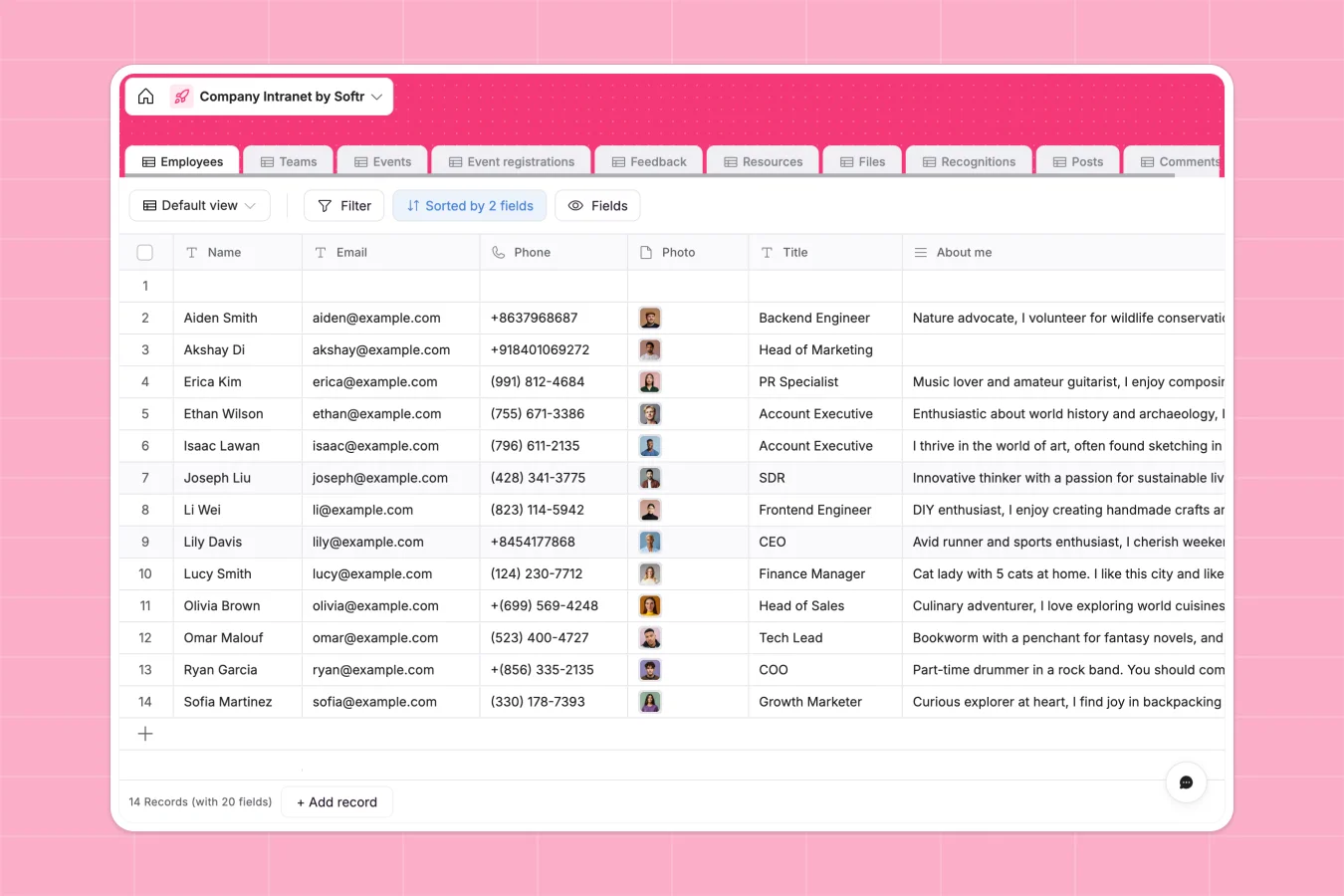
This company intranet database centralizes employee profiles, team structures, events, resources, feedback, files, recognitions, and internal discussions. It replaces scattered spreadsheets and disconnected tools with a single, well-structured system where everything connects naturally—employees link to their teams, events track RSVPs, posts accumulate comments, and recognitions flow between givers and receivers.
The database includes ten relational tables: Employees (with profiles, reporting lines, and activity tracking), Teams (with managers and member lists), Events (with RSVP management and automated past-event detection), Event registrations, Feedback (tied to teams), Resources (categorized by type with team-level access restrictions), Files (with category tags and team permissions), Recognitions (awards and shoutouts between employees), Posts (discussion topics with tags and pinning), and Comments (linked to specific posts). These tables connect through native relationships—lookup fields pull data across tables, formulas automate status updates, and every record maintains clear ownership and timestamps.
Why use this company intranet database (instead of spreadsheets)
Spreadsheets fragment intranet data into multiple disconnected files—one for employees, another for events, a third for resources—making it difficult to see relationships or maintain consistency as your organization grows.
The power of Softr Databases
Softr Databases enforce proper structure with typed columns (datetime for event schedules, select fields for employee roles, linked records for team membership) that prevent data inconsistencies. Unlike spreadsheets where fragile VLOOKUPs break when rows shift, this database uses native relational connections—employees link to teams, event registrations connect to both events and participants, posts accumulate comments automatically. Following the one table = one object principle keeps your intranet scalable: one Employees table with filtering and views instead of separate spreadsheets for each department. This structure also provides API access and serves as a foundation for building full intranet applications.
Core features and functionality
The database tracks comprehensive employee profiles including reporting hierarchies, role types, and activity histories across all intranet functions. Event management includes automated past-event detection through formulas, RSVP tracking with participant lookups, and full registration history. Files and resources support team-level access restrictions, category-based organization, and clear ownership—every item tracks who created it and when. Recognition flows capture both givers and receivers with photo lookups for visual displays, while the discussion system connects posts to comments with tag-based categorization and pinning for important announcements.
-
Employees
Centralize staff profiles with roles, reporting lines and activity logs
-
Teams
Manage organizational departments with managers and team-specific files
-
Events
Organize company workshops and town halls with locations and schedules
-
Event registrations
Track employee attendance and RSVPs for internal corporate events
-
Feedback
Collect and store internal feedback linked to specific teams and members
-
Resources
Directory of company software, perks, and materials for employee use
Who is this company intranet database for
This database works for any organization managing internal communications, employee engagement, and team coordination:
- HR teams: Maintain accurate employee records with reporting lines, track engagement through recognition and event participation.
- Internal communications: Organize announcements, discussions, and resources in one searchable place with clear categorization.
- Operations teams: Manage company-wide events with RSVP tracking, coordinate team-specific files with access controls.
- Growing startups: Scale from 10 to 100+ employees without losing track of who reports to whom or where critical resources live.
- Department leads: Keep team files, feedback, and member information organized with proper team-level visibility.
How to take it further
Customize the database. Adjust select field values to match your organization's structure—modify Role types beyond Individual Contributor/Manager/Executive, update Event Type categories to reflect your company culture, or add custom resource categories for your specific tools and benefits. Since this is a native Softr Database, every field is fully editable.
Import your existing data. Use CSV import to bulk-upload current employee lists with team assignments and reporting structures, or leverage API connections to sync with your HRIS system automatically. This brings your existing intranet data into a properly structured format immediately.
Build an intranet app on top. Transform this database into a full company intranet with Softr's interface builder. Create employee directories with filterable team views, event calendars with one-click RSVP, resource libraries with category browsing, and discussion boards where employees can post topics and comment. Set up users and permissions so employees see public resources and events while restricting team-specific files to relevant members, give managers access to team feedback, and allow event creators to track registrations. Full-stack apps in Softr mean your Database + Interface + Workflows stay connected—when an employee registers for an event, it updates automatically across all views. A well-structured intranet database like this makes building the interface straightforward because the relationships and data types already support complex interactions.
-
1
-
2
-
3
-
4
Frequently asked questions
-
What is a company intranet database?
-
Why use a no-code database to build a company intranet?
-
How is a company intranet database different from spreadsheets?
-
Can I build an app with this company intranet database?
-
Is this company intranet database free?
-
Can I customize this company intranet database?
Start building today. It's free!
Build and launch your first app in under 30 minutes.