


Overview
This AI CRM database helps sales teams track contacts, companies, deals, and interactions in one structured system. It automatically enriches company profiles with industry classification, employee counts, and business descriptions by searching the web—eliminating hours of manual research.
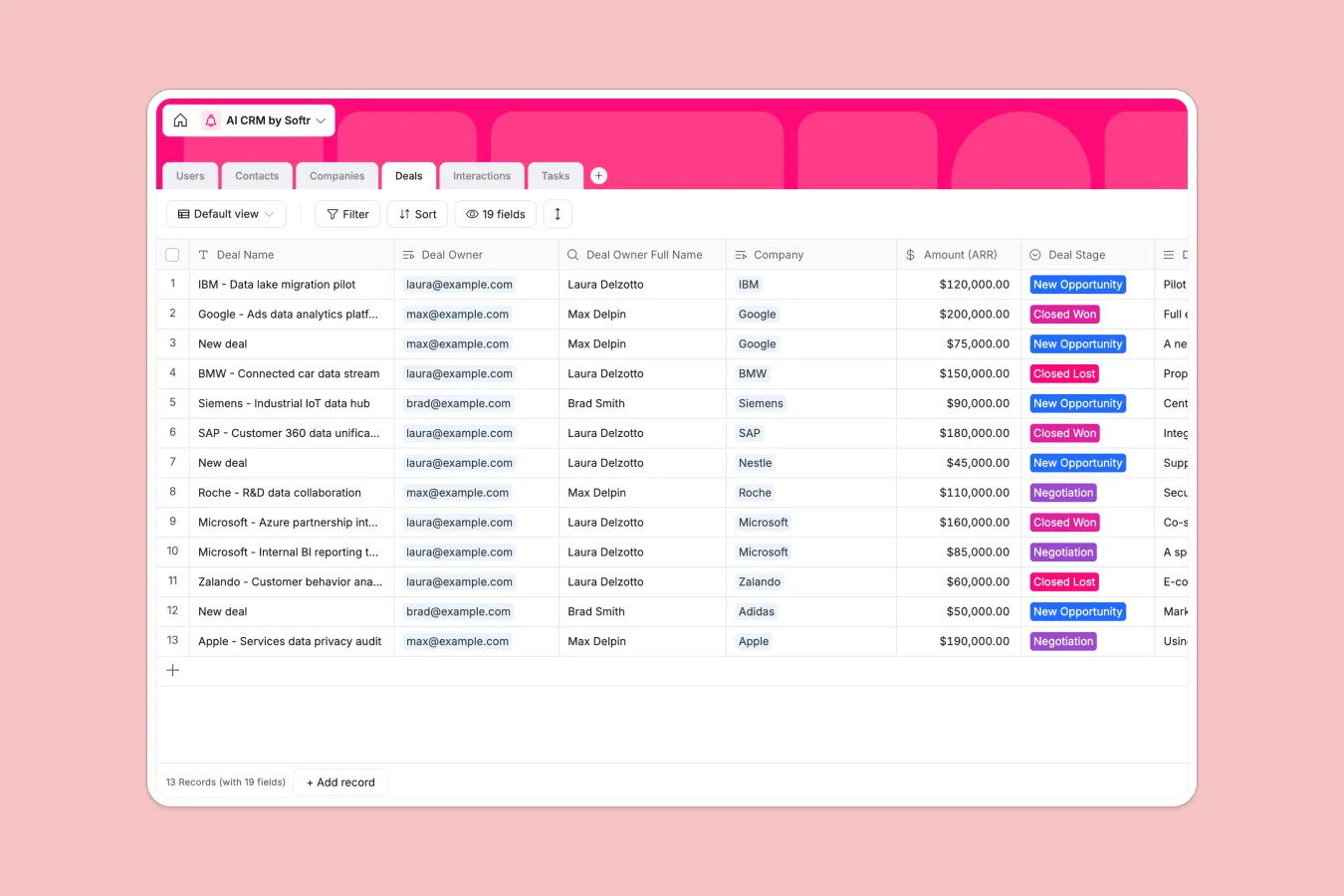
The database connects six relational tables: Users manage contacts and deals, Contacts link to Companies, Deals track opportunities with stages and amounts, Interactions log all touchpoints, and Tasks organize follow-ups. Each table uses linked records, lookups, and rollups to surface insights—like total interaction counts per company or deal ownership across teams.
Database AI agents power three key fields in the Companies table: Industry auto-categorizes businesses, Activity Description generates concise summaries from company websites, and Number of Employees pulls current headcount data. These agents trigger when new companies are added or domains updated, keeping your CRM data accurate without manual entry.
Why use this AI CRM database (instead of spreadsheets)
Spreadsheets force teams to create multiple tabs for contacts, companies, and deals because filtering and managing views becomes unwieldy. Columns end up mixing data types—dates, notes, and numbers all in the same field—making analysis unreliable as your pipeline grows.
The power of Softr Databases
This Softr Database enforces proper structure: email fields only accept emails, currency fields format deal amounts correctly, and datetime fields ensure consistent date tracking. Linked records connect contacts to companies natively—no fragile VLOOKUPs that break when rows shift. Rollups automatically count interactions per company, and lookups pull company owners through contact relationships. Following the one table = one object principle makes your data app-ready and scalable.
Core features and functionality
The template tracks complete customer lifecycle: from initial contact through deal closure. Database AI agents automatically research and populate company data—industry, description, employee count—using web search when records are added or domains updated. Interaction logging captures every email and meeting with timestamps, while rollups surface engagement metrics across your entire customer base. Deal stages, task assignments, and ownership tracking ensure nothing falls through the cracks.
-
Users
Manage team members with roles and assignments for contacts and deals
-
Contacts
Track individual professional relationships and their interaction history
-
Companies
Store firmographic data with AI enrichment for industry and activity
-
Deals
Monitor sales opportunities through stages with revenue and timelines
-
Interactions
Log all communication touchpoints including emails and client meetings
-
Tasks
Organize actionable items linked to specific deals and team members
Who is this AI CRM database for
This database serves teams that need structured customer relationship management without hours of manual data entry:
- Sales teams: Track pipeline stages, deal values, and follow-up tasks while AI enriches prospect data automatically.
- Account managers: Monitor all customer interactions in one place with visibility into engagement history and ownership.
- Business development: Qualify leads faster with auto-populated company details and industry classifications.
- Revenue operations: Analyze deal patterns, interaction frequency, and pipeline health using reliable structured data.
- Growing businesses: Scale customer management beyond spreadsheets with proper relational structure and AI-powered enrichment.
How to take it further
Customize the database
Adjust select field values to match your sales process—modify Deal Stage options to reflect your pipeline (Qualification, Proposal, Negotiation), add industry categories relevant to your market, or customize user roles beyond Admin and Sales Rep. As a native Softr Database, you can rename fields, add columns for custom data points like lead source or renewal dates, and configure AI agent prompts to research specific company attributes.
Import your existing data
Upload contacts, companies, and deals from spreadsheets using CSV import for bulk uploads. For ongoing synchronization, use the API to automatically sync customer data from existing tools or marketing platforms, ensuring your CRM stays current without manual updates.
Build an app on top
Once your data is structured, build an interface for your team to manage the CRM daily. Create dashboards showing deal pipelines by stage, contact lists filtered by company or owner, and task views organized by due date. With Softr's users and permissions, sales reps see only their assigned contacts and deals while managers access full pipeline visibility. The interface connects directly to this database—changes sync instantly, and workflows can trigger automated follow-ups or notifications when deal stages change. A well-structured relational database makes building these interfaces straightforward because data relationships are already defined.
-
1
-
2
-
3
-
4
Frequently asked questions
-
What is an AI CRM database?
-
Why use a no-code database to build an AI CRM?
-
How can AI help managing CRM data?
-
Can I build an app with this AI CRM database?
-
Is this AI CRM database free?
-
How is an AI CRM database different from spreadsheets?
Start building today. It's free!
Build and launch your first app in under 30 minutes.