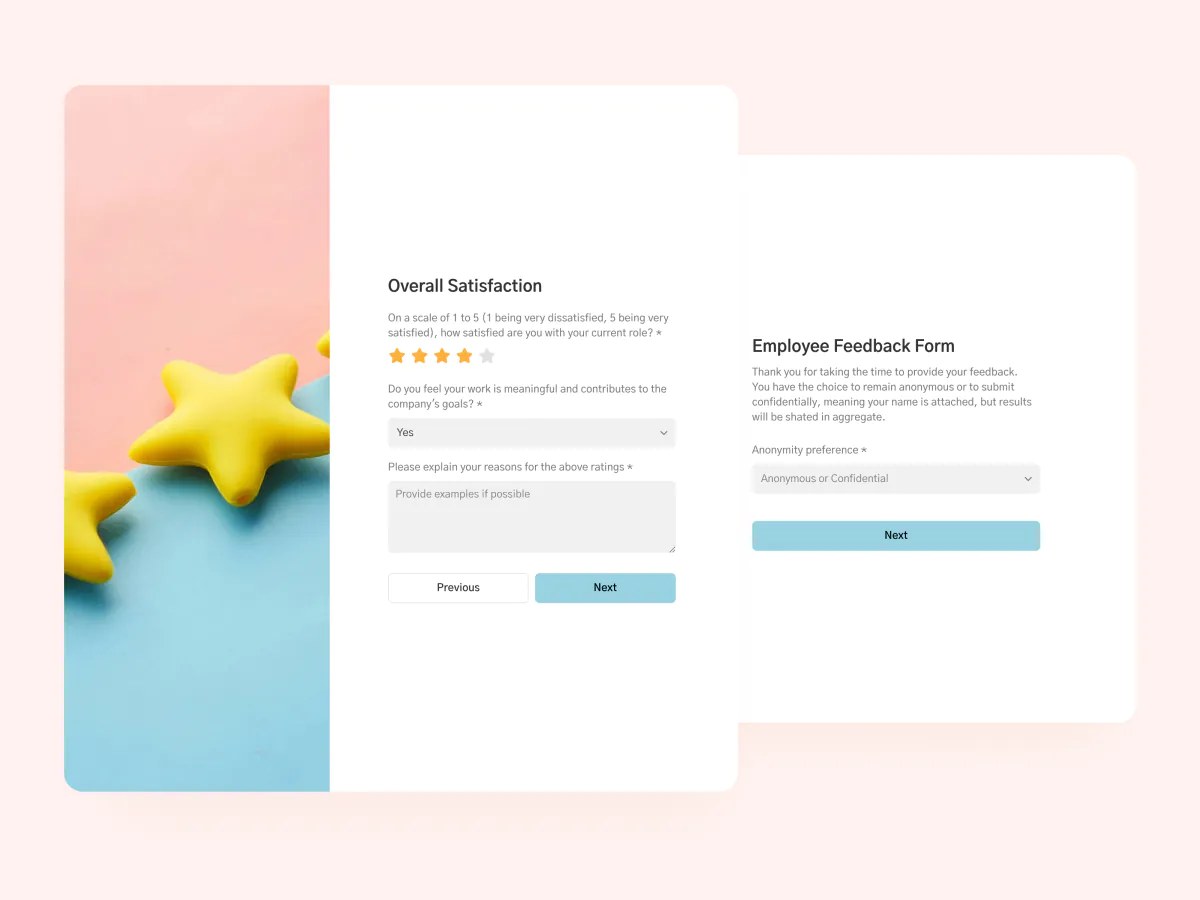
Understand employee satisfaction levels, identify areas for improvement, and foster a positive work environment.

Overview
This free employee feedback form template helps HR teams, managers, and business owners collect meaningful employee feedback, without third-party form tools, email threads, or spreadsheets.
Use it to gauge employee sentiment, identify areas for improvement, and foster a healthier, more productive work environment. All responses are stored in a connected database, so you can track trends and take action with confidence.
It comes with a sample database that organizes responses automatically, giving you a real-time view of employee insights.
Why use this employee feedback form template
- Capture honest insights: Use optional anonymity and open-ended fields to encourage honest, constructive feedback from employees.
- Tailored experience: Customize questions, steps, and logic to fit your company’s culture and goals, whether you’re running regular pulse surveys or post-onboarding check-ins.
- Actionable data: Responses flow directly into your connected database or spreadsheet, making it easy to analyze trends, filter by team or timeframe, and follow up effectively.
Template features:
- Customizable fields
Build a feedback form that fits your team. Choose from rating scales, checkboxes, text fields, and more.
- Multi-step form experience
Break longer employee feedback surveys into smaller steps to improve focus and completion rates.
- Rating scales
Capture an overall satisfaction score with a 5-star rating, then use quick yes/no/somewhat questions to zero in on specific areas like career growth, feedback quality, and company culture.
- Optional anonymity
Encourage honest responses by allowing employees to submit feedback anonymously when appropriate.
- Open-ended feedback
Give employees space to elaborate on their answers or share suggestions you might not have thought to ask for.
- Responsive design
Ensure a smooth experience on any device, whether employees are filling out the form from their desktop or mobile.
- Custom branding and domain
Keep your form on-brand with your company’s colors, logo, fonts, and domain.
- Thank you page
Close the loop with a custom thank you message that lets employees know their feedback is valued.
Who is this employee feedback form template for?
This template is ideal for any organization that wants to collect clear, structured feedback from employees. Here’s how different teams can use it:
- HR departments: Run recurring engagement surveys, exit interviews, or new hire check-ins to keep a pulse on employee satisfaction.
- Team leads & managers: Collect ongoing feedback from direct reports to improve team dynamics and communication.
- Startups & small businesses: Get ahead of growing pains by building a feedback culture early, even without a dedicated HR team.
- Customer support & field teams: Reach remote employees or frontline staff who may not speak up in meetings.
- IT & operations: Use feedback to monitor tool adoption, onboarding satisfaction, or internal process improvements.

“What we love most about Softr is the instantaneous, customizable power a no-code platform allows.”
- 1
- 2
- 3
- 4
Frequently asked questions
- What is an employee feedback form?
It's a structured form used to gather input from employees on their experience at work. This template tracks five core dimensions: growth opportunities, feedback quality, communication, sense of belonging, and workplace culture, plus an overall satisfaction rating.
Employees answer through a mix of ratings and select fields, with room for open-ended comments on anything you want to dig into. That combination gives you both a quick score to track over time and real context behind it.
- What data sources can I use this form with?
The template includes a sample database to store form answers, but you can also connect it to Google Sheets, Notion, HubSpot, ClickUp, or any other Softr-supported data source.
If you switch data sources later, existing responses stay put in the original source. You'll need to migrate them manually if you want everything in one place, so it's worth deciding on your data source early, before responses start piling up.
- Can I make the form anonymous?
Yes, you can give employees the option to submit their responses without identifying information. This encourages more candid feedback, especially on sensitive topics.
The form includes an Anonymous or Confidential field where respondents choose how their answer is handled: Anonymous strips any identifying info from the record, while Confidential keeps it on file but visible only to whoever manages the responses.
- Is this employee feedback form customizable?
Absolutely, and you don't need to code to do it. Duplicate the template into your own Softr workspace, then prompt the AI Co-Builder to add a question, tweak the rating scale, or restyle the thank you page in plain English, or make the same changes yourself with the visual drag-and-drop editor.
For example, you could turn the single overall satisfaction rating into five separate ratings, one for each dimension the form tracks, then add a conditional follow-up question that only appears if someone rates communication as Somewhat lacking. Change field types, add or remove steps, apply conditional logic, update branding, and edit the thank you page, however you prefer to work.
- What happens after someone submits feedback?

Responses land straight in the connected database, but you don't have to check it manually. Set up a Softr Workflow that notifies HR or a manager by Slack or email the moment a new response comes in, or that flags submissions with a low satisfaction rating so you can follow up quickly on issues that need attention.
You can also route by content: for example, trigger a separate alert whenever someone selects Somewhat or lower on belonging or culture, or auto-tag responses by department so managers only see feedback relevant to their team.